7/19/2012

How to Convert MPEG Files to WMV Format and Stream to Xbox 360?


When it comes to MPEG video, we usually take it as MPEG-1 or MPEG-2 rather than MPEG-4 which often comes with AVI or MP4 extension. MPEG files are difficult to stream from Windows Media Center to devices like Xbox 360. WMV is the best video file format for Windows Media Player and can be easily streamed from computer to Xbox 360.
The following steps are about how to convert MPEG to WMV whether you have an Xbox 360 or not. If you merely need WMV file for any reason, the conversion steps below will work. To convert MPEG to WMV, we need a MPEG to WMV video converter.
Steps on how to convert MPEG to WMV on Windows
Step 1. Import MPEG file by clicking “Add File(s)” button.
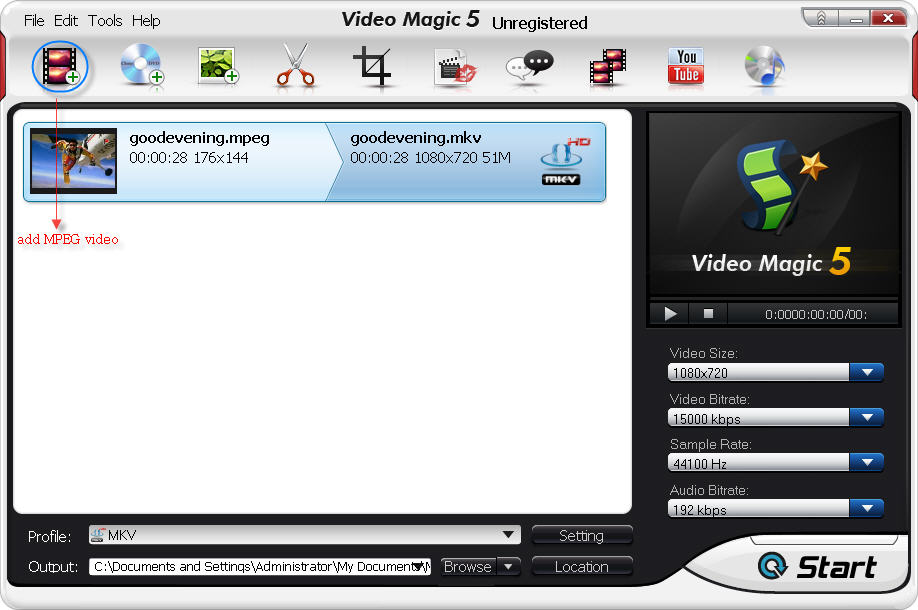
add-mpeg-video
Step 2. Go to “Common Video” and choose WMV as output format.
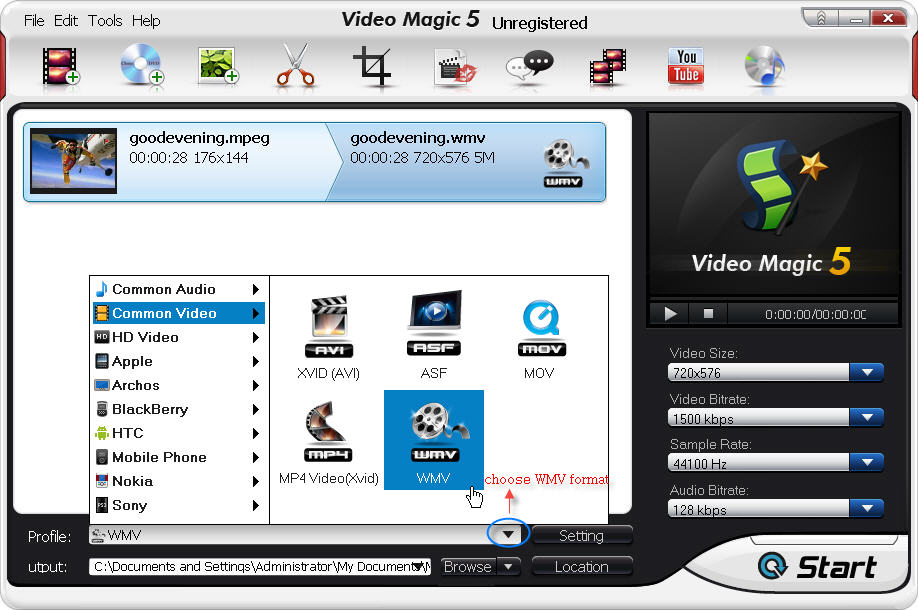
choose-wmv-as-output
Step 3. Click “Output – > Browse” to set the destination to save the converted video files. And also you can customize files by clicking “Edit” and “Setting” before converting MPEG to WMV.
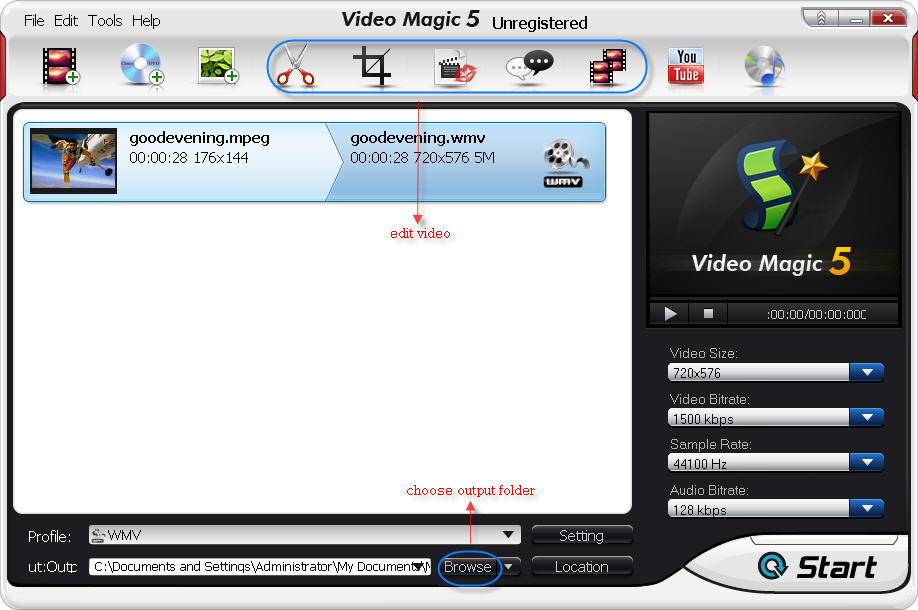
set-output-folder-to-save-wmv-video
Step 4. Click “Start” to begin the MPEG to WMV conversion process.
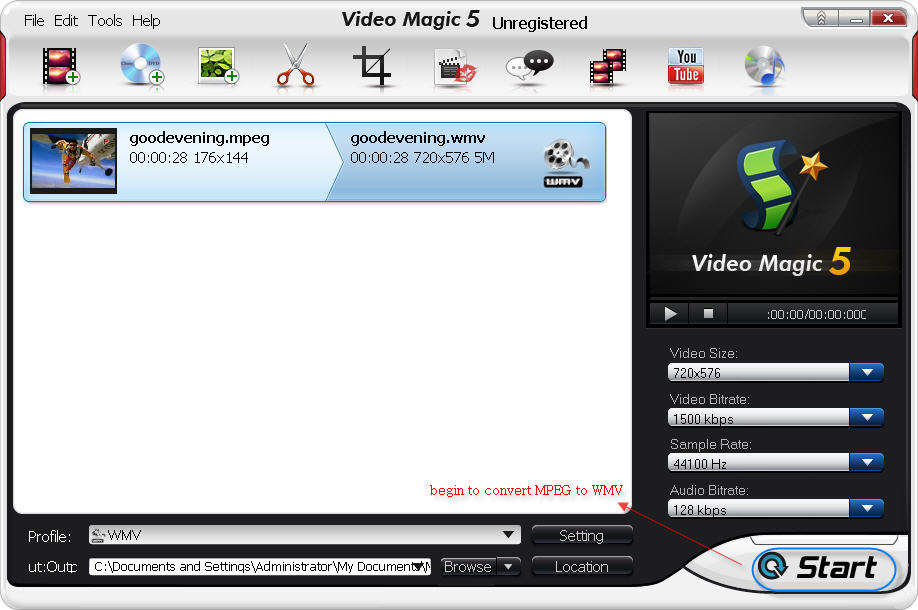
start-mpeg-to-wmv-conversion
It will take a while to finish the conversion process. After it finishes, you can transfer to video to Xbox 360 or just play it in WMP flawlessly.

7/16/2012

Burn Photos or Videos to a CD or DVD Using VideoFlick


Related Contents:

  • Burn videos or photos to a CD
  • Burn photos to DVD
  • Create a web photo album

Part 1: Burn videos or photos to a CD

With VideoFlick, any computer user can copy or burn pictures and videos to a writeable CD disc. The following instructions explain how to burn photos or videos to a CD using VideoFlick.
Step 1 Insert a writable CD into your computer’s CD recorder.
Step 2 Import your photos or videos by clicking “Import Picture/Video” and choosing the photo or video folder. Select the photos or videos you want to merge.
Step 3 Click “Burn to CD” button to turn to “Merge” box. Here we take “burn video to CD” as an example.
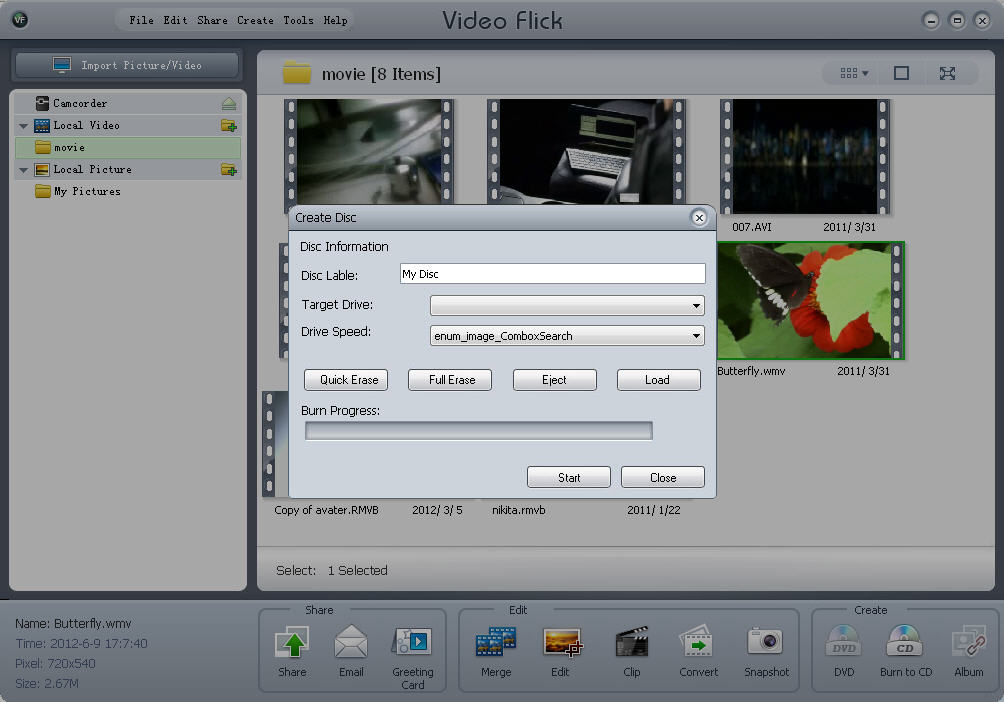
Step 4 Personalize your CD by setting: Disc Label, Target Drive, Drive Speed
Step 5 Click “Start”, few minutes later, the photo or video to CD burning progress will be finished.
how to burn photos to cd disc

Part 2: Burn photos to DVD

Besides burning photos to CD disc, you can also burn or copy your loved photos to DVD disc. Let’s see how it works:
Step 1 Import your photos by clicking “Import Picture/Video” and choosing your photo folder. Select the photos you plan to burn to the DVD.
Step 2 Insert a blank DVD into your DVD-burning drive.
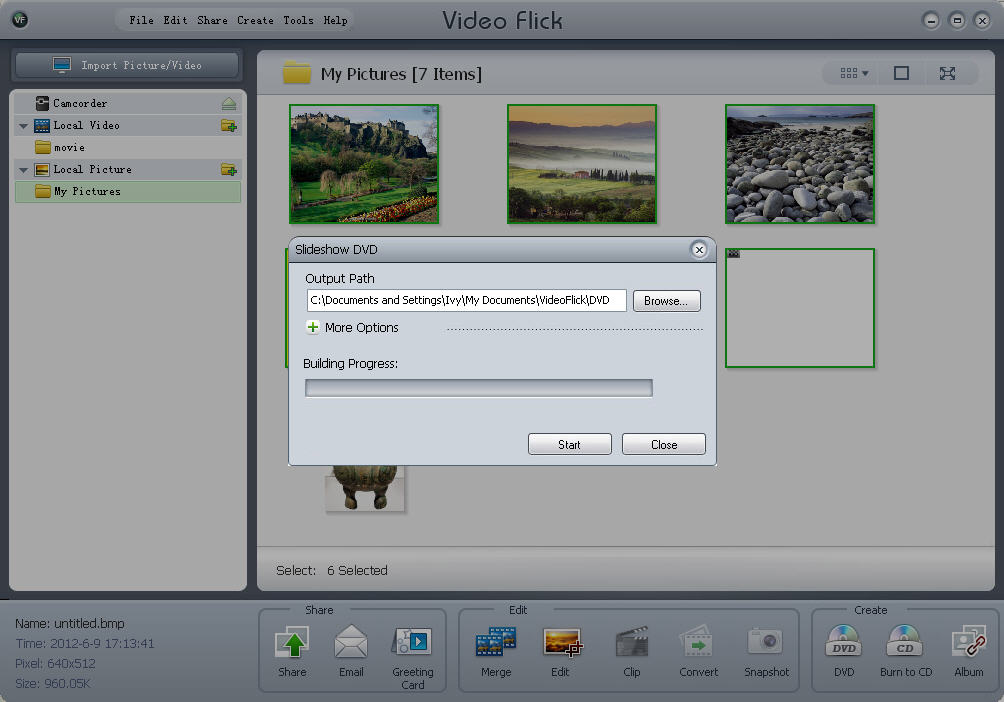
Step 3 Click “DVD” button to turn to the “Slideshow DVD” window.
Step 4 Set the output path and click “Start” button.
how to copy photos to a blank DVD

Part 3: Create a web photo album

VideoFlick makes everything so simple to create a web photo album of all the photos in a directory.  Follow the steps to learn how to create your web photo album:
Step 1 Import your photos by clicking “Import Picture/Video” and choosing your photo folder. Select the photos you want to create web album.
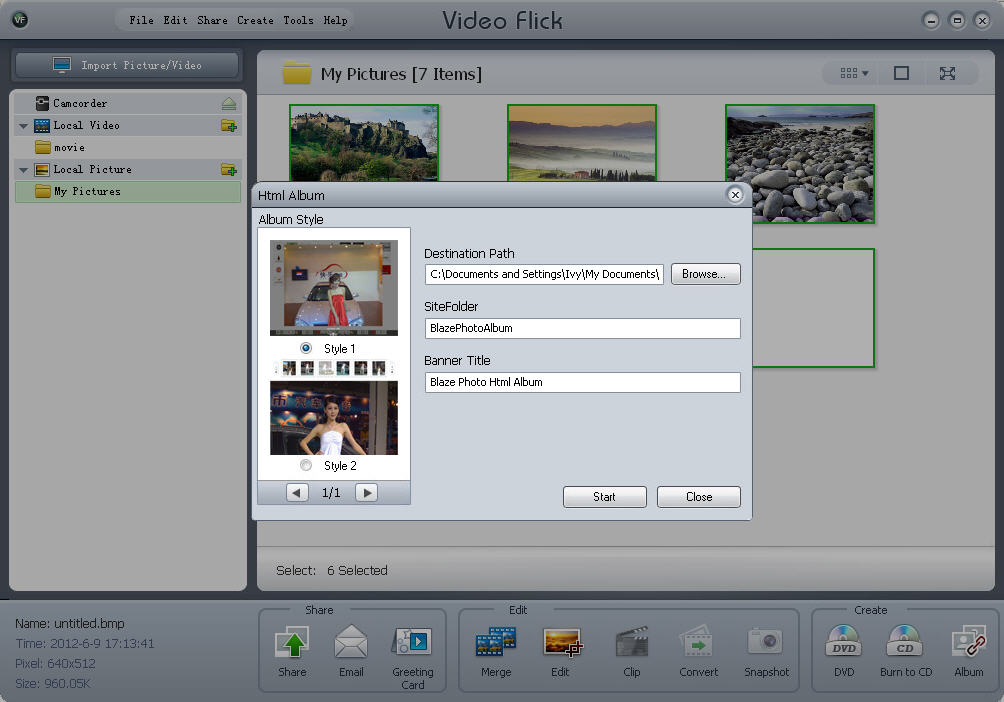
Step 2 Click “Album” button to appear “HTML Album” window.
Step 3 Custom your web album: set destination path, sitefolder, banner title.
Step 4 Click “Start” to create your own photo web album instantly.
create a web photo album

7/11/2012

Free Tips to Defeat DVD Region Code


Just imagine you buy a DVD from another country while on tourism, or order it online. But when you put the disc in your DVD player, there is just a message telling you “wrong region”. You would feel very upset, right?
There is really a region code to prevent you from playing DVDs acquired from other countries. Say, if you live in US or Canada, you friend just returned from Europe with the latest movie. Or you live in London, got a disc from US. You put it into the DVD player, got the chill message. That would be the most expensive Frisbee you’ve got.
A few companies issued region-free discs that will play anywhere in the world. But studios don’t because they want to control the date when DVDs will be released in different regions to stop people picking up bargains.  But it is legal to buy whatever discs you want from anywhere under the sun.
However, there is a thing we can do that is to defeat region codes. How? Use a region code free DVD player.

HARDWARE REGION CODE FREE DVD PLAYER

region code free dvd playerYou will find there are a lot of region code free DVD players on sale in electronic shops or online stores, and some of them are astoundingly cheap and do a great job. They are able to play PAL from Europe and NTSC discs from North America.
If you are willing to purchase an upconverting player for superior picture effects, you have to pay more for a higher level one. LG, Toshiba, Philips are offering different class region code free DVD players for different demands.

SOFTWARE REGION CODE FREE DVD PLAYER

region code free dvd player softwareThere is also region free DVD player software to play any disc on a computer. Just download a setup file and install it in your computer, you will watch any DVD movie as you like. You may think Region Code is not a big problem, but if you travel a lot, you will see many must-have DVDs at quite low prices, then you will realize what Region Code means to you.

7/06/2012

Why online games run slow on my computer


It must be very annoying the Internet becomes disconnecting or slow when playing online game. So why online games run slow on my computer? Here we show a list of various reasons for the slow online games.

SLOW ONLINE GAMES REASON 1: CONNECTION SPEEDwhy my online games run slow

The Internet connection speed can greatly affect the speed of online games. A modem user will have much higher ping than other players during playing online games.

SLOW ONLINE GAMES REASON 2: SERVER

There are also many other factors that can contribute to a slow or laggy online game experience, including where a server is located, how many players are playing on the server at the same time, what connection the server has, or how fast the computer server is. On this problem, follow any of the below for recommendation:
  1. Check if all users are experiencing high pings or high latency. If all users are slow, it means that the server is a slow computer or has too many players for the connection being used at once.
  2. Change to an alternate server. If the server you are playing on is in another country in the world, it may cause the slow connection with some games.
  3. Play the game at a different time of day. If the server is being used for more than just running a game server, it may be experiencing a heavy work load or high bandwidth usage, which may cause the game to slow down.

SLOW ONLINE GAMES REASON 3: UPDATES

When your online game goes slow, see if you have the latest updates for the game together with the operating system you are using on computer. Updating the game to the latest version, updating the drivers in computer, and updating the operating system can help to improve a game performance effectively.

SLOW ONLINE GAMES REASON 4: MORE COMPLEX ENVIRONMENT

When entering an area with some other online players, the stress on your PC can increase for the requirements of the needs to load each of the characters and their actions. If the computer performance decreases every time when other players are on your screen or around, you need to try to decrease the video quality of the game, which can be done by the Settings or Display area of the game.

HOW DO I KNOW THE PING IN MY ONLINE GAME?

In fact, almost all online games offer a feature which can be enabled or disabled and allow players to see the ping or latency of Internet connection with the game server. But where this information is located and how to enable or disable it is different on the games.

HOW TO KNOW IF MY PING IS HIGH?

The higher the ping or latency values on your game, the worse your connection. To see if the ping is high when compared with other players on the save server, it depends on the game and the server. The color coded ping, latency or connection indicators can be used to see if the ping is high or not, on which, the red for bad (high ping), yellow for ok, and green for good (fast or low ping).

6/28/2012

How to Rip Video Clips from DVD Movie and Make Your Own Movie for iPhone?


Suppose you want to rip excerpts from DVDs for educational purpose, whether in-class publication, or at conference presentations, you just need some short clips and edit them to a special video to show a phenomena or your opinion. Is there any tool available for making clips from DVDs offers its own workflow and need for partner programs?
There are many programs that can rip the whole disc, main movie, chapters from DVD, but few of them make grabbing a specific clip from a DVD film. If you want to rip some video clips and make a special movie for iPhone, you can try Aviosoft DVD to iPhone Converter. The DVD Rip mode makes it simple to rip any part of a DVD that you want. In this guide, I will explain how to rip DVD clips for iPhone.

RIP DVD CLIPS FOR IPHONE GUIDE

Before ripping DVD clips, download the DVD to iPhone converter first and install it on a Windows computer.

Step 1. Load the DVD

Run the program after successful installation. Insert the disc into DVD drive tray and close it. The converter will auto read the disc, show the DVD information.

Step 2. DVD Rip and Edit

1). Choose “DVD Rip” mode and uncheck the titles in “DVD Content” area.
2). Rip DVD clips: click  to open the clip window. Play the disc in the player, so that you can decide which part you want to clip. Click  to set the start time point. Click  to set the stop time point. Click  to begin a new clip. You can also merge the clips into one file. Click “OK” if you have grabbed all you want for a new movie.
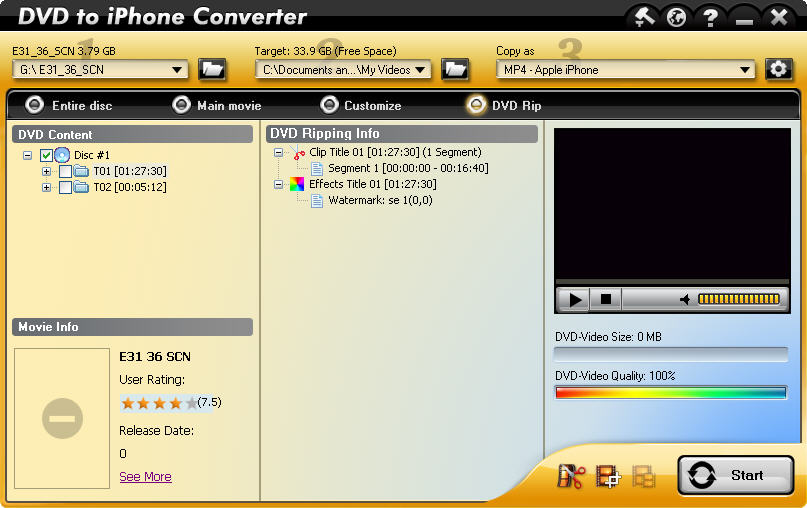
3). Add effect: Click to open the editing effect window. You can “Crop” the image size by dragging the red points. You can click  to add watermark on the movie. Drag the watermark to change its position.
After all things finish, click “OK” to end the clipping and editing. You will see all the clips display under DVD Ripping info
clip videos
4). Merge clips: Select the video clips and click  to merge the titles together.

Step 3. Convert to iPhone

Choose an output folder and click “Start” to convert the merged clip to iPhone。

6/21/2012

How to Rip the Main Movie Only to iPod/iPhone/PSP/BlackBerry/Smart Phone?


Can we isolate the main movie off a DVD? Just the movie, not the entire disc and keep the original quality? A DVD usually contains additional trailers, menus, sound tracks, bonus footages which occupy large space. When we rip the disc to mobile devices like iPod, iPhone, PSP, BlackBerry, smart phone, we would like the content to be concise because those devices have limited capacities.
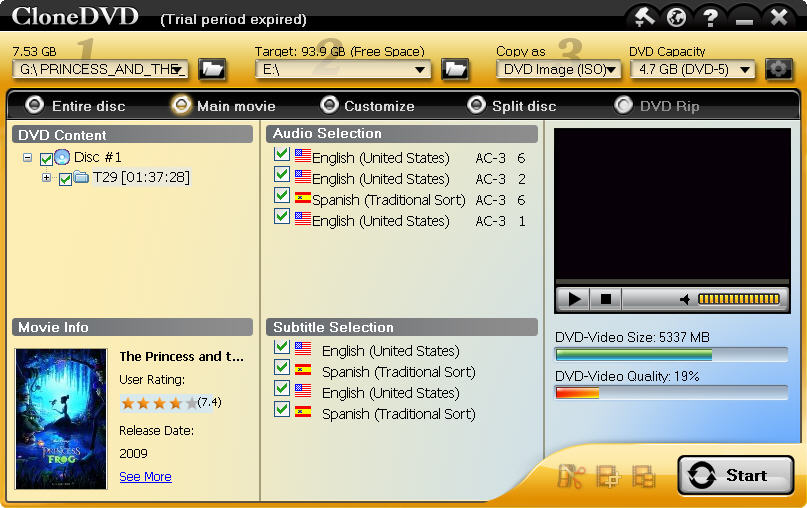
The Main Movie mode in CloneDVD for Mobile removes all the unnecessary stuffs, allows users to only rip the main movie from a DVD movie to portable devices.

RIP MAIN MOVIE GUIDE

Follow the below steps to get started.

Step 1. Run CloneDVD for Mobile

Download and install the DVD ripper on a Windows computer. Run it after the successful installation.

Step 2. Load the DVD

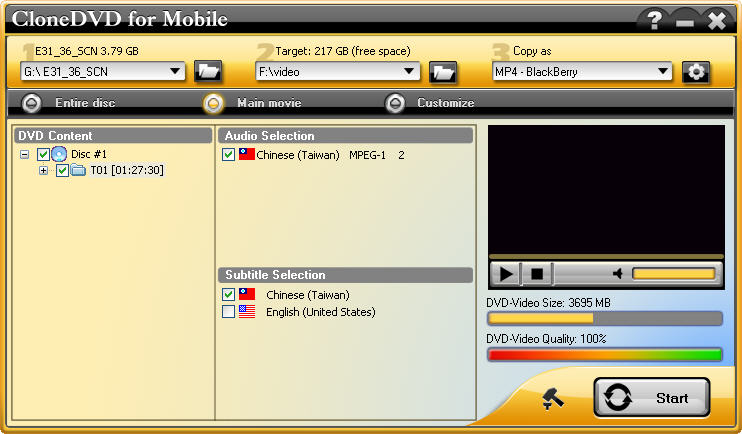
Put the disc into the DVD drive tray. The DVD information will appear on its main interface (size, quality, audio, subtitle, DVD content).
main interface - clonedvd for mobile

Step 3. Common Settings

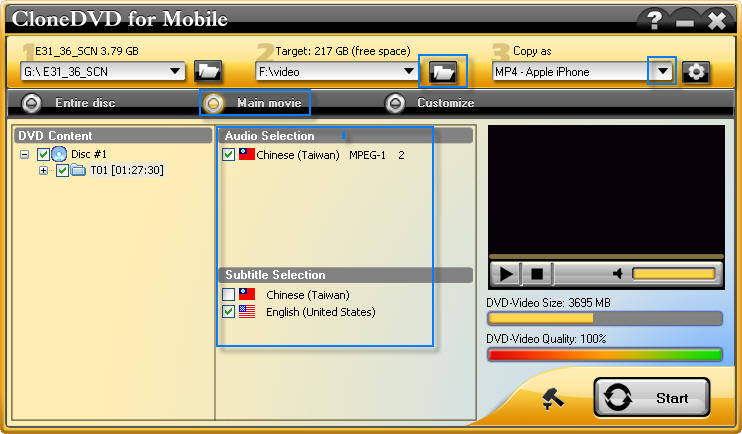
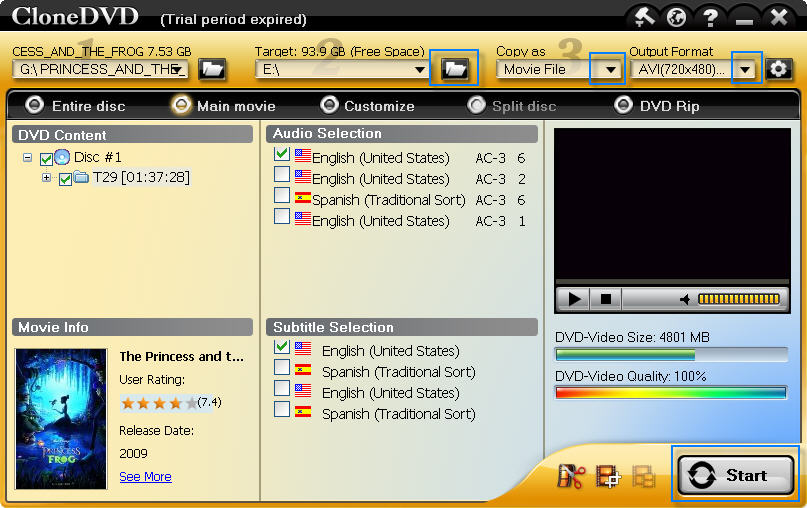
Choose Main movie mode, select the audio and subtitle. In Main movie mode, you are not allowed to choose any chapter or title.
Choose a target folder to save files, select the output format according to your need.
common setting - rip main movie

Step 4. Start Ripping Process

After all the settings have been done, click “Start” button to begin ripping main movie to device.

4/12/2012

Hard disk space optimization

The popularity of the broad band, of many computer users want to download resources to enrich your hard disk. As a result, the hard disk, however, are spacious and have been filling. If the optimization of hard disk space that consumes less space is limited by disk space efficiently to resolve the deficit problem.

Disable the hibernation function system

Similar to the system of XP and Vista, hibernation file win 7 is a lot of space. Sleep function is generally rarely used. Therefore if your hard disk is not "rich", can disable hibernation. Open the "run" and type "cmd" to entry, open a command prompt window and type "powercfg-h off" and "enter" to complete, press the key.

Delete the files from the system is unusable

Files system Win 7 in a folder is not used by many users. Users of these files can be deleted only if necessary. If you do not know which files should be deleted and what should be, you can use software like Tuneup Acebyte utilities or optimization. This software will tell you what files to remove, and what is not.

Clean unwanted files

After running the system for some time, some will not cache files are created. These files are not used, but the space of the system. Once you have these files regularly is definitely a release of space on your hard disk.

File compression "Winsxs".

Few people may know that win 7 "winsxs" folder of the Windows directory occupies about 4 GB of space. However, this is a very important folder may not be deleted from the system. Compression can reduce the space consumed.

Locate the "winsxs" folder and move the cursor to the folder. Right click and select "compress a folder" and wait until the finish line. During this process, the files are in use when you are prompted "pop up, select" ignore all "button."

After compression, with more than 1 GB, which would be remarkable, which reduces the size of the "winsxs" folder

After the optimization above reduce to less than 3 GB, win 7 transactions. These methods of optimization for relatively safe, does not affect the performance of the system.

4/05/2012

Find some Apps Android Tablet easy with market Tablified

If you're among the growing number of owners of Android-powered tablets, you may have experienced some frustrations with selection of app Google exhibit (formerly Android Market).

This is because the app store Google mixtures apps phone and tablet, with no clear way to differentiate between them. So you frequently encounter apps which are not designed (or the less optimized) for your tablet.

Market Tablified HD is like an app store for tablets. He slaughter all applications optimized set of Google bar, at the same time you giving reviews and news related to the application. Considered as a single window for the discriminating Android Tablet owner.

This is not just some fancy filtering used to cough, the list of the compatible tablet apps; developers to choose those which take full advantage of the larger screen of a Tablet and, if possible, take advantage of bar Action and Fragments of Android API.

In other words, they separate the wheat app from the app, the chaff being built for phones Android apps.

Unfortunately, market Tablified step perfect. First of all, must be Android 3.0 or later, so you can forget to run on your old, Froyo or Gingerbread-powered tablet.

Also, it is a bit slow, which can be frustrating. Developers are aware of this and work to optimize their servers.

There is a Lite version of Tablified market which is free, but it is heavy on ads. For a mere $1.49, you can obtain market Tablified Pro, which offers an experience without publicity. If you have a compatible Android tablet, you should definitely try one or the other.

Contributing editor Rick Broida writes on business and consumer technology. Ask for help with problems from your PC to the hasslefree@pcworld.com, or try the Treasury of useful people in the Community Forums of PC World. Subscribe to the newsletter of PC hassle by email to each week.


2/20/2012

You know How to Copy DVD to Hard Disk?

There is no doubt that DVD can be played on DVD player, but it is impossible to carry along your DVD player with you when you are on a trip. Want to copy some DVDs movies to your computer and enjoy them conveniently? Or just make copies of DVD contents to avoid damage, loss and theft. Then here comes the question: how to copy DVD to hard disk?
What you need is DVD copy software. DVD copy software is designed to duplicate the content of a DVD and copy DVD to hard disk, blank DVD or other devices. The purpose of copying DVD is to prevent the original DVD been stolen, physically damaged or ruined and make playback easier.
Enlarge DVD collection
Hard disk is large enough to save as many as DVD contents. Newer computer is usually equipped with a 500+ GB hard disk. With such a large hard disk, you can enlarge your DVD collection without piling up a lot of DVD discs. Copying DVD to hard disk with DVD copy software, you will get 100% original DVD image and sound quality.
Remove copy protection to make playback easier
To stop privacy, DVDs are produced with copyright protections or restrictions. DVD copy software like CloneDVD will automatically remove those copy protections such as CSS, RCE, RPC, region code, CPPM, APS, UOPs, ARccOS, RipGuard, etc. After removing those protections, you can easily play the digital files with many media players.
Step-by-step guide:
Step 1: Download and install CloneDVD on Windows operation system computer.
Step 2: Insert the DVD into DVD-ROM, the program will automatically load the DVD disc.
Step 3.1: Choose “copy DVD as DVD Image (ISO)” and specify ISO image file size.
copy DVD to hard disk - ISO
Step 3.2: Or you can choose “copy DVD as Movie File” and choose a format.
copy DVD to hard disk - Movie File
Step 4: Choose a copy mode according to your need and specify a target to save file.
Step 5: Start to copy DVD to hard disk.


=========================================================


dvd player clone dvdfree video converter blackberry converter blackberry video converter dvd to blackberry converter 

2/15/2012

Melt Your Loved One’s Heart on This Valentine’s Day


It’s really romantic and remarkable time for all the lovers. Everyone is eager to present something special to the people they love. BlazeVideo also join this important holiday. Their software can make this day more remarkable.
A dreamlike trip, or romantic dinner, or going to the cinema, or just staying at home to enjoy some great movies. Backup & rip DVD collections to playback on your iPad with BlazeVideo DVD to iPad Converter. Save 50% big discount on this great gift by obtaining the coupon code on the Valentine’s Day promotion.
Powerful Features:
1.       Convert all DVDs to Mp4 for iPad. It enables you to convert all copy protected DVD to MP4 for playback on iPad.
2.       Make your own movie. With powerful video editing function, you can clip video segments, crop video size, merge several chapters into a big one and add watermark to make your movie unique.
3.       Three converting modes and high quality. This DVD to iPad converter provides you three converting modes; choose anyone according to your need. It offers you excellent video image and audio by extracting video and audio from the original DVD.
Product: BlazeVideo DVD to iPad Converter
Coupon Code: VALENTINEROSE
Original price: USD29.95
Now: USD14.97
You save: USD14.98 (50%)
Click here to checkout, tick “I have a discount coupon”, paste the coupon code into the box and refresh the page. 


==========================


video format converter ,photo editing software ,dvd copy ,free 3gp converter
,
convert 3gp to wmv ,dvd to 3gp converter